MCP Apps
MCP Apps (io.modelcontextprotocol/ui) lets your server ship an
interactive HTML UI that an MCP host renders — in a sandboxed iframe —
in place of plain tool output. mocapi implements the server half
only: declaring ui:// HTML resources and linking tools to them.
mocapi does not provide the in-iframe JavaScript — see
Two halves, one boundary below before you
start.
For the architecture behind this guide, see the MCP Apps design doc, and ADR-0033 / ADR-0034 for the decisions.
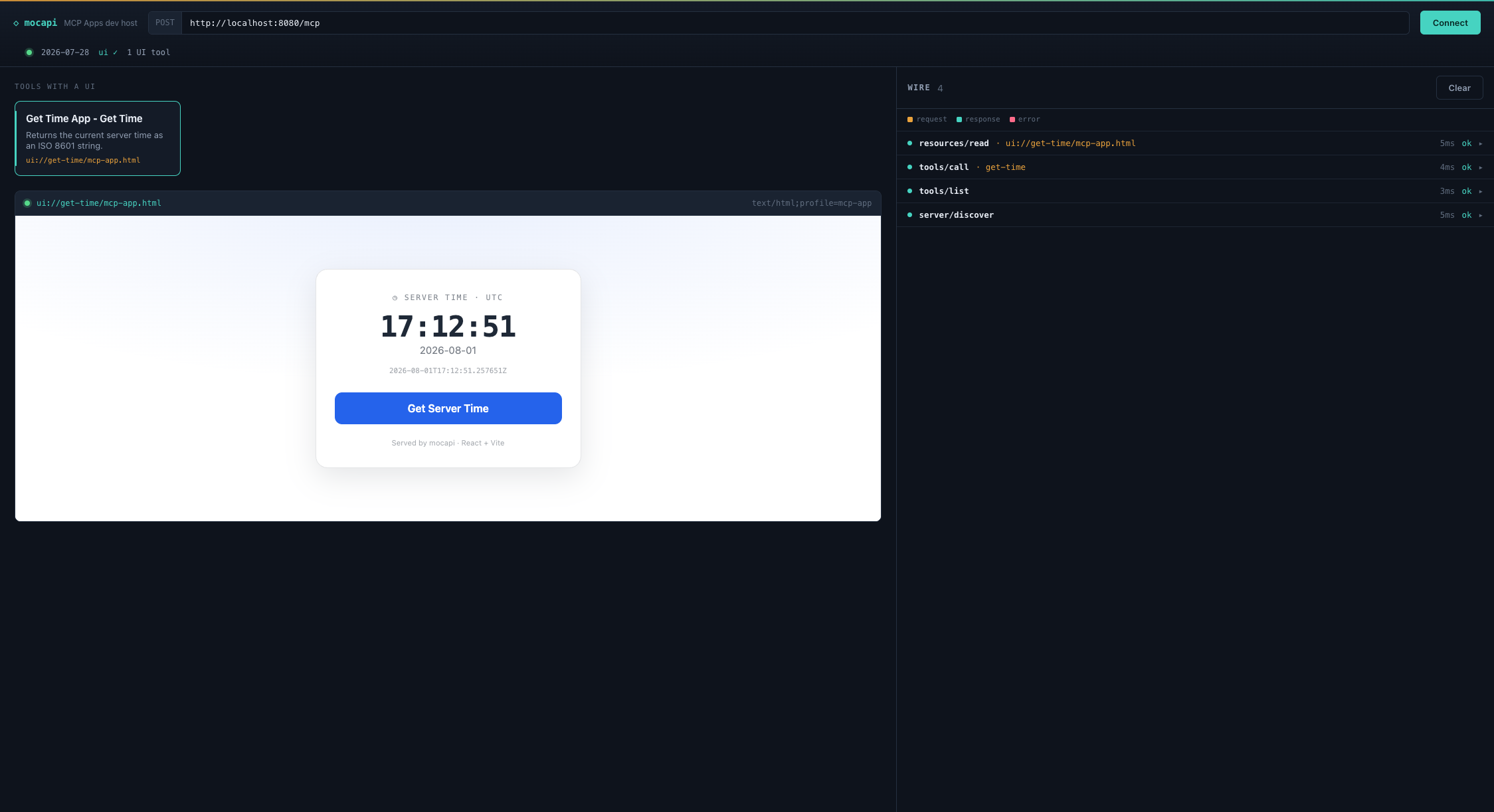
A mocapi App, rendered end-to-end — a ui:// resource in a sandboxed iframe,
linked to the tool that populates it. This is the get-time example
shown in the dev host, whose Wire panel (right) shows the
underlying 2026-07-28 traffic:
Two halves, one boundary
MCP Apps splits into a server surface and a host/in-iframe JS surface:
| Who provides it | |
|---|---|
Serve ui:// HTML resources, link tools to them, declare the ui capability |
mocapi (mocapi-apps) |
Sandbox handshake, postMessage JSON-RPC bridge, ui/initialize, display-mode negotiation, app-registered tools |
The MCP host (e.g. the client application rendering the iframe) |
The JS running inside your ui:// HTML that talks to the host over postMessage |
You, using the official ext-apps JS SDK — mocapi does not ship this |
mocapi serves your HTML bytes content-agnostically. It has no
postMessage/iframe-bridge code and never will under this design —
that layer belongs to the host and to whatever the in-iframe app links
against. Go get the official JS SDK for the in-iframe side; this
guide only covers the server metadata that makes your resource
discoverable as an app.
Add the dependency
<dependency>
    <groupId>com.callibrity.mocapi</groupId>
    <artifactId>mocapi-apps</artifactId>
</dependency>
MocapiAppsAutoConfiguration activates automatically once mocapi-apps
is on the classpath (@ConditionalOnClass) — no explicit @Enable...
needed. Omitting the dependency leaves everything else in mocapi
unchanged: no descriptor gains _meta, and @McpTool/@McpResource
discovery behaves exactly as it does today.
Declare a ui:// resource with @McpAppResource
@McpAppResource is a specialization of @McpResource — it registers
through the same resource-discovery path, with the MIME type defaulted
to text/html;profile=mcp-app and the URI required to use the ui://
scheme:
import com.callibrity.mocapi.apps.Csp;
import com.callibrity.mocapi.apps.McpAppResource;
import com.callibrity.mocapi.model.ReadResourceResult;
import org.springframework.stereotype.Component;

@Component
public class WeatherApp {

    @McpAppResource(
        uri = "ui://weather/dashboard",
        name = "Weather Dashboard",
        csp = @Csp(connect = "https://api.weather.com"))
    public ReadResourceResult dashboard() {
        return ReadResourceResult.ofText(
            "ui://weather/dashboard",
            "text/html;profile=mcp-app",
            """
            <!doctype html>
            <html>
              <head><title>Weather</title></head>
              <body><div id="root"></div>
                <!-- pin a specific version and add integrity="sha384-..." (Subresource
                     Integrity) once you know the real asset's hash — omitted here because
                     this URL is illustrative, not a real CDN asset. -->
                <script type="module" src="https://cdn.example.com/weather-app.js"></script>
              </body>
            </html>
            """);
    }
}
Like every @McpResource method, this can return a full
ReadResourceResult or one of the convenience return types — a
String/CharSequence, byte[]/ByteBuffer, or a Spring Resource
(see the resources guide).
So the body above can also be a bare return """<!doctype html>…""";.
If the bundle is a static file, you usually don't need a resource method
at all — see Serve a bundle from a file
below.
The <script> in your HTML is where the official ext-apps JS SDK goes
— that script establishes the postMessage handshake with the host.
mocapi has no opinion on how you build or bundle it; serve it inline,
from an external CDN URL your CSP allows, or as a separate mocapi
resource.
@Csp — declaring what the UI needs
@Csp lets you declare the CSP origins the host should allow the
iframe to reach. Empty arrays mean "no external access":
@Csp(
    connect  = {"https://api.weather.com"},   // fetch/XHR/WebSocket targets
    resource = {"https://cdn.example.com"},   // scripts/styles/images
    frame    = {},                             // nested iframes allowed inside yours
    baseUri  = {})                             // allowed <base> targets
mocapi only declares this; the host is responsible for enforcing it
on the rendered iframe. You can also declare requested sandbox
permissions on @McpAppResource itself:
@McpAppResource(uri = "ui://weather/dashboard", sandbox = {"allow-scripts"})
Both csp and sandbox show up in the resource's _meta.ui — see
Wire shape below.
Every String/String[] attribute here — @McpUi's value, resource,
and visibility; @Csp's four domain lists; @McpAppResource's
sandbox — resolves ${...}/#{...} placeholders per element, the same
mcpAnnotationValueResolver convention the rest of mocapi's annotations
follow (see Externalizing Metadata).
McpUiReferenceValidator compares the resolved @McpUi URI against
resolved resource URIs, so a shared placeholder like
${app.dashboard-uri} on both sides still matches after resolution.
CSP/sandbox defaults and the mocapi.apps.* properties
A @McpAppResource that leaves csp/sandbox at their empty defaults
falls back to server-wide defaults from mocapi.apps.*:
mocapi.apps.csp.connect=https://api.example.com
mocapi.apps.csp.resource=https://cdn.example.com
mocapi.apps.csp.frame=
mocapi.apps.csp.base-uri=
mocapi.apps.sandbox=allow-scripts
The fallback applies per CSP domain list, not per-@Csp-instance: if
your resource declares @Csp(connect = "https://api.example.com") and
leaves resource/frame/baseUri empty, those three fall back to the
matching mocapi.apps.csp.* default while connect keeps its literal
value. sandbox falls back as a whole when left at {}.
This is deliberately per-list rather than "annotation present vs.
absent": Java gives no reflective way to tell "@Csp was written with no
elements" apart from "@Csp wasn't written at all" — both produce the
identical all-empty default instance. sandbox's {} default has the
same limitation. If you need a resource with zero CSP/sandbox even
though a server-wide default is configured, that specific combination
isn't expressible today — declare the resource without a global default,
or accept the default.
Add @McpUi to an existing @McpTool method to tell the host which
ui:// resource renders that tool's results:
import com.callibrity.mocapi.api.tools.McpTool;
import com.callibrity.mocapi.apps.McpUi;

@McpTool(name = "get_weather", description = "Get the current weather")
@McpUi("ui://weather/dashboard")
public WeatherResult getWeather(WeatherArgs args) {
    return weatherService.current(args.location());
}
@McpUi changes no discovery or invocation behavior — the tool is
still discovered and called exactly as @McpTool alone would. It only
adds _meta.ui.resourceUri to the tool's descriptor. The data your UI
renders is still the tool's ordinary CallToolResult
(structuredContent is the typical vehicle) — there's no separate
context object to inject.
By default visibility is ["model", "app"] — both the model and the
in-app UI can see the tool. Narrow it if only one side should:
@McpUi(value = "ui://weather/dashboard", visibility = "app")
visibility here is the MCP Apps UI-access axis (model vs. app), not
mocapi's authorization-Guard visibility
(guards guide) — the two are unrelated concepts that
happen to share a name. mocapi emits Apps visibility as metadata
only; it does not enforce it.
Serve a bundle from a file (@McpUi(resource=…))
When your UI is a static bundle on the classpath, you don't need a
resource method at all. Point @McpUi.resource at the bundle and mocapi
contributes the ui:// resource for you
(ADR-0036):
@McpTool(name = "get_weather", description = "Get the current weather")
@McpUi(value    = "ui://weather/dashboard",
       resource = "classpath:/ui/weather-dashboard.html")
public WeatherResult getWeather(WeatherArgs args) {
    return weatherService.current(args.location());
}
That single tool is the whole server surface — no @McpAppResource
method. mocapi serves the file's bytes at ui://weather/dashboard as
text/html;profile=mcp-app, resolved once at startup via Spring's
ResourceLoader (so classpath:/…, file:/…, and any other
ResourceLoader location work). A missing file fails the boot with a
clear error, not a blank iframe at render time.
- The URI is logical, the location is fixed.
value()is the wire identity; the bytes come only from the literalresourcestring. Neither is ever built from request input — there is no way for a client to make the server read an arbitrary file. - Reuse is fine. Several tools may link the same
value(); mocapi registers one resource. Two tools naming the samevalue()with differentresourcelocations fails the boot. - Serve-mode is the thin, public path. These resources carry no
guards, no observability, and a default
_meta.ui(default CSP, no extra sandbox). When you need guards, custom@Csp/sandbox, observability, or generated content, declare an@McpAppResourcemethod (with any return type) and leaveresourceblank —McpUiReferenceValidatorstill checks the URIs line up at boot.
Choose per app: @McpUi(resource=…) for a static bundle you just want
served; @McpAppResource when the resource needs logic or policy.
What the host does with it
Once your server declares these, the flow from a host's perspective is:
- Discovery —
server/discoverreports theio.modelcontextprotocol/uicapability (mocapi always emits it oncemocapi-appsis on the classpath — noinitializehandshake to gate on).resources/listshows yourui://resources with their CSP/sandbox_meta.ui;tools/listshows tools carrying_meta.ui.resourceUri. - Render — the model calls your tool; mocapi returns a normal
CallToolResult. Seeing_meta.ui.resourceUrion the tool descriptor, the host fetches the linkedui://resource viaresources/readand renders it in a sandboxed iframe, applying the declared CSP/sandbox. Your in-iframe JS (the ext-apps SDK) then completes the handshake with the host and receives the call result. - App calls a server tool — an action inside your rendered UI
(e.g. a "Refresh" button) goes App → Host → Server, arriving at
mocapi as a completely ordinary
tools/call. Nothing about that request is Apps-specific on the server side.
All of steps 2 and 3 past resources/read are host/iframe concerns —
mocapi's job ends at serving descriptors and HTML bytes.
Wire shape
What actually goes over JSON-RPC once you've applied @McpAppResource
and @McpUi:
// tools/list entry
{ "name": "get_weather", "description": "Get the current weather", "inputSchema": {…},
  "_meta": { "ui": { "resourceUri": "ui://weather/dashboard", "visibility": ["model", "app"] } } }

// resources/list entry (static default)
{ "uri": "ui://weather/dashboard", "name": "Weather Dashboard",
  "mimeType": "text/html;profile=mcp-app",
  "_meta": { "ui": { "csp": { "connectDomains": ["https://api.weather.com"] } } } }

// resources/read content
{ "uri": "ui://weather/dashboard", "mimeType": "text/html;profile=mcp-app",
  "text": "<!doctype html>…" }

// server/discover capabilities (excerpt)
{ "capabilities": { "extensions": {
    "io.modelcontextprotocol/ui": { "mimeTypes": ["text/html;profile=mcp-app"] } } } }
Building the in-iframe side
Everything after "the host fetches your HTML" is JavaScript running
inside the iframe, talking to the host over postMessage. mocapi does
not provide this — use the official
modelcontextprotocol/ext-apps JS SDK
to handle the sandbox handshake (ui/initialize), receive tool-result
data, and (if your UI needs it) call back into server tools. Treat your
ui:// resource's HTML as an ordinary static web app that happens to
be served by mocapi and rendered in a host-controlled iframe — the SDK
and your app's own JS own everything that happens after the bytes leave
resources/read.
What's out of scope in v1
- No per-response
_meta.uioverride onresources/readcontent (draft-only in the spec) — v1 supports only the staticresources/list/resources/readdescriptor form shown above. - No call-time
UiContextfor injecting UI metadata dynamically per invocation — the tool↔UI link is static, resolved at descriptor-build time, before any call happens. - No app-registered tools or display-mode negotiation — both are host/iframe concerns.
See the design doc for the full rationale.